Posts

Image
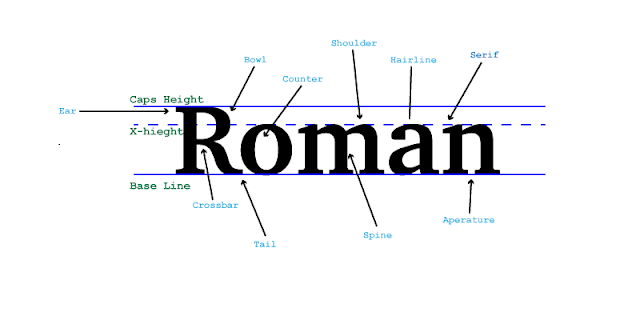
Project In Graphic Design this week we have been learning about typography. We have learned about the origins of some fonts, how serif fonts add design to the letters and how san Serif just means without Serif. We also learned about Comic Sans and how over used it is which leads typist to not be very fond of it. We also learned how to describe fonts and that is what we did in this project. Process In this project we followed along with a video to show us the new things we had to learn in Adobe Illustrator. We learned words that describe the font. In this project we used Adobe Illustrator to show the different parts of the letters. We needed 13 words to describe it to finish the project. This was probably one of my favorite Graphic Design projects we have done so far.


Making my own Color Wheel

Image
What I learned In this project I learned a lot about how to use Adobe illustrator. I learned the ways it differs from Photoshop like how photoshop uses pixels and thats why it blurs when you zoom in but illustrator it remakes the image so you can zoom without giving up quality. Process I started with making my circle. next I created a triangle that would fit in with the circle. Then I used option drag the make a new one the same size and I flipped it and made it with dashed lines. Then I made all the shapes. I created the first shape then used option drag to make them all the same size. Lastly I filled in the colors the complete my project. Take Aways Something I took away from this projects was how to use the basics of Adobe illustrator. I also know more about the color wheel like the names of all the colors, the names of their groups, what the triangles are for and much more.

Color Schemes by Logos

Image
How Logos use Color Schemes By Roman Clark  This company uses the analogous colors of yellow and blue. I think this company uses this colors because they look good and work well together.  This company used the analogous colors of green, yellow-green, and yellow. I think this company probably choose these colors because they work well together. This company used the analogous colors of orange, red-orange, and green. I think this company chose these colors because they look good together. This company uses the cool colors of dark blue and light blue. I think this company chose these colors because the cool colors go along with what they are selling.                              This company uses the cool colors of dark blue and light blue and black. I think this company chose these colors because like the first cool logo it goes along with what they a...

Building my Website

Image
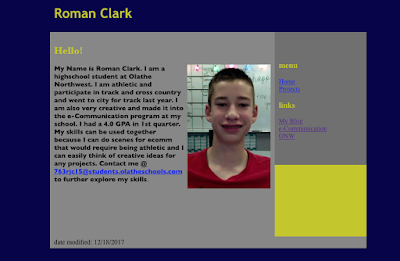
Building my Website In Dreamweaver        In e-Communication we created websites for our final projects. It was a challenging project that tested our skills we have learned but this projects was a fun learning experience. We followed along with videos created by Mr.Olson. I started by making home page that you can see at the top. We started with a template that already had the side bar and main page since we were beginners. Then I added by picture and inserted our previously created Elevator pitch. Lastly for the home page I added in the links too the school websites.        Next I added in my projects page that you can see to the right. This page has a few of my previous projects from Animation and Video that I took in 1st semester. I chose to put in my Chase Scene project and my Google Sketch up House. After I created both pages I went back and made it look good by added colors that worked well together.       ...

Chase Scene

Image
My team worked well together on our Chase Scene video and we had fun making it. Some struggles we had before we started was figuring out how to make a good reason to get someone to chase another person. We all agreed on the location and we chose our location close to the hallway to make sure we could have room to run. We determined our roles based on past roles we had in other projects. The editing process was different for all of us and I ran into many technical difficulties, mostly with the internet. Something we could have done better was making sure we had the equipment set up faster to and make sure we used our time wisely.

A to B Sequence

Image
       In Ecomm we made a video moving from point A to point B. We incorporated the 6 shots we learned earlier and filming sequence. We had a few ideas but chose to go with what you can see in the finished video. Our group worked well together and we got the filming done in 1 class period. While editing in Premier Pro I cut down the clips to Make them within the time limit of 1 minute. I also choose a song off on ISM Films that I felt matched my video.        In our video we wanted a good reason for moving from point A to point B. That gave use the idea we used in the video. We moved from the classroom to the nurse's office.        Our team worked well together and there isn't anything I can think of that I would change. One things I would change about our shots is the lighting and make sure it isn't too bright.

How to Print a Document

Image
               In Ecomm we transitioned to video because it is second quarter. Our first project was to create a video using all the different shots we learned showing how to print a document. The first day we planned out what we were going to do on a story board. Unfortunately Braedon was gone the first two days so Thalia and I had to create the story board so we choose Braedon as our model, with his approval. Thalia and I both switched off setting up the camera and choosing which shots we needed. We used our technical skills you get the project done quickly and efficiently. If I had to do the project over again I would do easier shots so we could get it done in one day and not have to redo because we weren't wearing the same clothes. I would to the editing the same because it looked good. In my next project I would make sure we can still get good shots but do it within the amount of time we had. This was a fun project and ...